

How to Organize Your Digital Files Like a Pro: Tips and Tricks for Better File Management
Digital file management doesn’t require organizations to be obsessively tidy, just a system that is simple enough to follow consistently. By doing so, files can be found in seconds. In this blog, we give some tips on how to get there.
Start With a Naming System You’ll Stick To
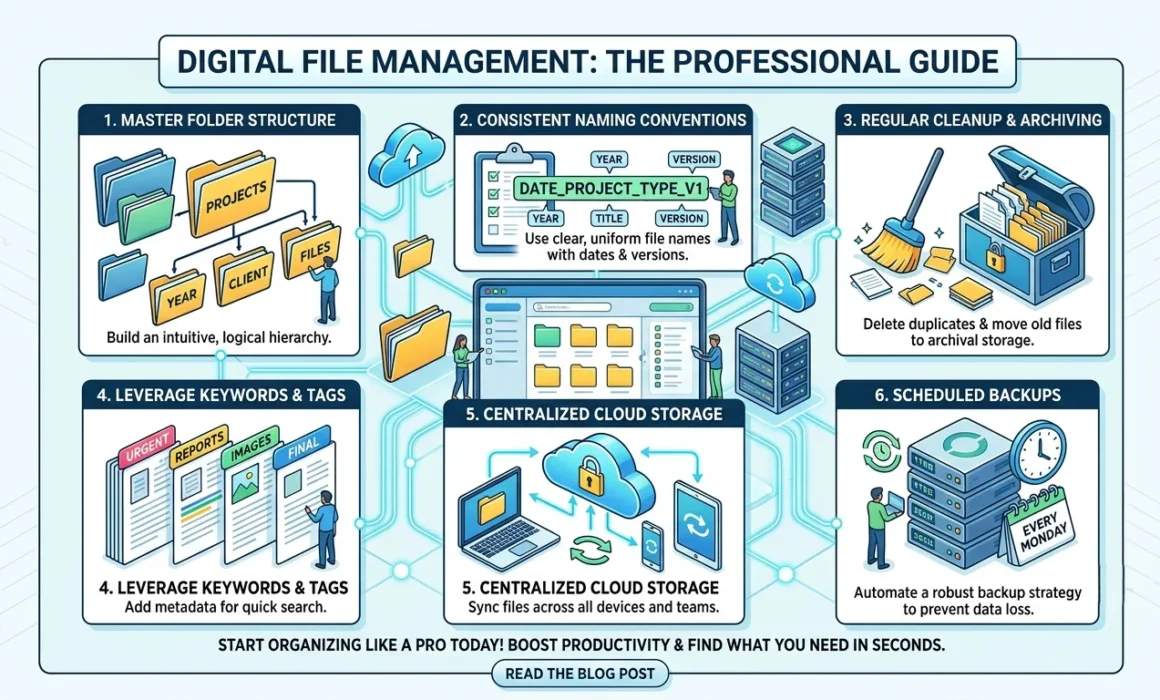
Although folders help with organization, they only go so far if the files inside them are named incorrectly. This is why file naming conventions are important for a strong digital file management system.
Naming conventions should be simple and explain the file content. An example of a strong naming convention is 2026-07-07_ClientName_ContractType_v1, which states the date, name, document type, and version. By putting dates at the front, everything gets sorted chronologically and including version numbers prevents multiple working copies.
A naming system should be predictable and consistently followed by everyone on a team, allowing people to find what they need without having to ask where it is.
How to Organize Computer Files Without Overthinking It
Deep and elaborate folder structures aren’t required to have organized computer files. Simpler approaches tend to hold up longer and make it easier for everyone to use. Grouping broad categories first and narrowing them down to make folder structures three or four levels deep is sufficient to keep digital files organized.
Regular cleanups are also helpful to keep structures in place. Removing duplicate files, archiving unused documents, deleting old drafts, and reassessing files and folders can help prevent a messy buildup. A good rule of thumb to follow is to declutter digital spaces as you would physical spaces.
Consistency Matters More Than the Perfect System
There are many effective strategies to keep files organized, but the one thing that undermines it all is saving things differently every time. Organizing files under different categories or conventions creates a system that nobody understands, making it difficult to sustain and access information.
Pick a logic and apply it consistently across the organization. For teams handling client work, intuitively, organizing by project or client is easiest to maintain since that’s how people naturally think about their work. For teams with strict compliance or reporting obligations, organizing by date makes it easier to pull information from a specific period. Departmental organization tends to work best for large companies where different teams rarely need access to each other’s files.
Building Better Habits Over Time
Good file management is more than a one-time cleanup project. It requires lasting good habits. Reviewing folders once or twice a year, retiring naming conventions that aren’t working, and setting simple expectations for new employees when they join have a big impact on keeping systems running and ensuring long-term usability.
For businesses handling a high volume of documents, whether that’s scanned paper records, client contracts, or compliance files, this kind of structure affects how quickly staff can respond to a client request, how easily a document can be produced if it’s needed for an audit, and how much time gets wasted every week simply looking for things.
Frequently Asked Questions
What is the golden rule of file naming?
Be consistent. Put the most useful sorting information first, whether it’s the date or the client or project name, followed by a clear description of what the file actually is and the contents. Whichever convention works best for your team, the golden rule is to apply it the same way every time by everyone.
Should I organize by project, date, or department?
That depends on the work your team does and the processes in place. Client-facing organizations, such as real estate, property management, and legal firms, tend to benefit from putting the client or project first, since that aligns with how requests come in. Terms with strict regulations and compliance requirements often do better organizing by date, making it easier to pull records from a specific period. Larger businesses with distinct departments sometimes use a department-first structure, allowing teams to organize files so they can see all relevant documents to their department in one place.
What is the PARA Method, and why is it so popular?
PARA method is an organizational system for digital information based on how actionable it is rather than what kind of file it is. PARA stands for Projects, Areas, Resources, and Archives. Projects are considered active efforts with a clear goal and deadline. Areas are ongoing responsibilities without a defined endpoint. Resources are the reference materials you might need later, but aren’t actively working on. And Archives hold anything that’s no longer active, but is worth keeping.
This method is being increasingly adopted because it organizes information by relevance to current tasks rather than categories. It makes information for current work more accessible and tends to last longer than typical folder structures.
Are folders becoming obsolete because of search?
For individuals working alone, searching for a file is often faster than navigating to it. However, for teams, folders create a shared, predictable structure that everyone can rely on. Search works best when people already know roughly what they’re looking for, but folders help when they don’t. A well-run system takes advantage of both search and folders together rather than treating them as replacements for the other.
How can AI help me stay organized automatically?
AI-assisted tools can now handle a lot of the manual work that file organization used to require. This includes automatically tagging documents based on content, flagging duplicate files, suggesting where a new file should be saved based on similar past documents, and even renaming files according to a set convention without manual input. For businesses managing large volumes of scanned or digitized records, this kind of automation reduces the ongoing effort needed to keep a system consistent, since it doesn’t rely entirely on every employee following the rules perfectly every time.