

OCR Technology for Real Estate Documents Explained
Real estate documents pile up fast with the number of documents handled with every close, renewal, or new tenant. Optical character recognition (OCR) is a practical way to help handle all the paper files into something usable that the computer can read and search. This blog breaks down what OCR can do to real estate documents, why it matters for brokers and property managers, and what to expect after implementation.
What OCR Actually Does
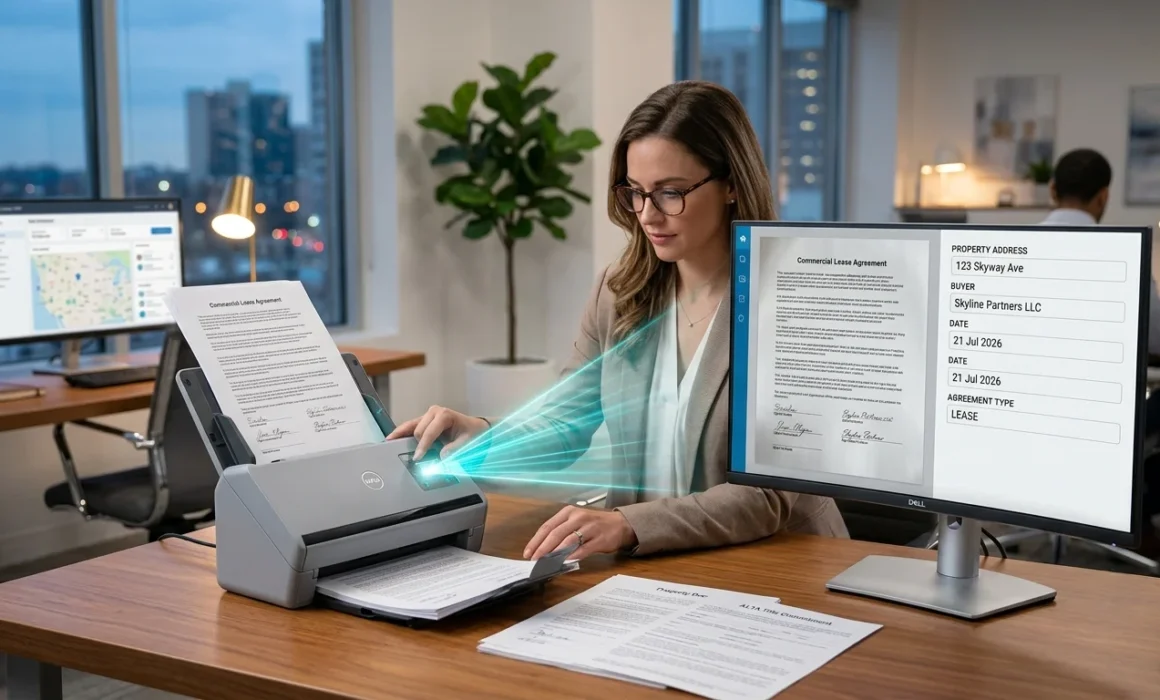
OCR real estate application works by scanning a physical or image-based document and converting the visible text into machine-readable data. For example, an image of a lease agreement can’t be read by a computer, but when OCR software analyzes the shapes on the page and matches them with known character patterns, a text layer is produced underneath the image. Once that text exists, the document becomes searchable, sortable, and usable in ways that flat images never could.
Specifically for real estate, this matters because the industry’s paperwork originates outside a digital system. Title documents come from land registries. Older leases might have been signed decades ago and stored in a filing cabinet. Mortgage discharge documents often arrive by fax or scan from a lender. OCR for real estate documents bridges the gap between these paper-based origins and the digital systems that brokerages and property managers rely on today.
Searchable Property Records Change How Teams Work
Before OCR was used, finding a specific detail in a lease meant manually searching for a file, flipping through the pages, or scrolling through a PDF. Searchable property records solve this by making every scanned image act identically to a typed document. A property manager can type a tenant’s name, a unit number, or a specific term to pull up every relevant file instantly.
This is where the value of document retrieval systems shows its impact. A well-indexed archive turns hours of manual file searching into a task that takes moments. For a brokerage managing hundreds of active listings and past transactions, or a property management firm overseeing dozens of buildings, this document searching capability changes daily operations in a very tangible way.
Digital Document Indexing Builds the Foundation
OCR alone extracts text, but digital document indexing is what makes that text useful. Indexing can organize files according to whatever fields matter most, such as category, date, address, or tenant name. When an OCR system is directly connected to an indexing system, every scan is automatically filed, rather than needing manual labelling.
This is particularly relevant for firms handling property records indexing across multiple locations or portfolios. A property management company with buildings in Calgary, Edmonton, and Vancouver needs a system where a search for “fire inspection report” pulls up the right document regardless of which office originally filed it. Good indexing built on accurate OCR output makes that possible.
Property File Automation and What It Solves
Property file automation goes a step further by using OCR-extracted data to trigger actions rather than just making files searchable. A lease renewal date pulled from a scanned lease agreement can automatically populate a reminder system. Mortgage documents can be flagged and routed based on extracted terms. AI document recognition tools can identify document types automatically, so a batch of mixed scans gets sorted into leases, mortgages, and inspection reports without a person manually reviewing each file first.
This kind of real estate data extraction reduces the administrative load that often falls on smaller teams. A brokerage without a dedicated records department can still maintain organized, searchable files because the heavy lifting of sorting and tagging happens automatically once documents are scanned.
OCR Software for Brokers Managing High Volumes
Brokers dealing with high transaction volumes face a particular challenge. Each closing generates a stack of documents, and over a career, that adds up to thousands of files that may need to be referenced again for legal, tax, or dispute reasons. OCR software for brokers addresses this by making historical files instantly retrievable. Document retrieval automation means a broker can respond to a client request or a legal inquiry about a transaction from five years ago without digging through storage boxes.
Firms operate under strict compliance obligations regarding record retention, so maintaining accessible and well-organized records is critical. Being able to locate a specific document quickly when asked isn’t just convenient, but shows a defensible and professional operation.
FAQ
What is OCR?
Optical character recognition (OCR) is a technology that scans images of text from photographs, scanned pages, or PDFs and converts that text into a format that computers can read, search, and edit. By formatting it in a way computers can read, the document is better supported for search and data extraction.
How accurate is OCR for real estate files?
Modern OCR systems typically achieve accuracy rates in the high nineties for clean, typed documents such as standard lease templates or title records. Accuracy tends to dip with older documents, poor scan quality, or unusual fonts, but with a strong OCR process combined with quality control checks, the results produced are reliable enough for daily business use across most real estate documents.
Can OCR read handwritten documents?
OCR can read handwriting, but results vary more than with typed text. Clean, printed handwriting on forms tends to convert reasonably well, while cursive or inconsistent handwriting is harder for any system to interpret reliably. For real estate files with handwritten notes or signatures, many firms use OCR for the typed portions of a document while flagging handwritten sections for manual review.
OCR does have the capability to read handwriting, but results vary more than with typed text. Clean, printed handwriting tends to convert reasonably well, while cursive or inconsistent handwriting is harder for any system to interpret reliably. For real estate files with handwritten notes or signatures, many firms use OCR for the typed portion of a document and flag the handwritten section for manual review to ensure accuracy.
Does OCR improve file searches?
Yes, significantly. Without OCR, a scanned document is just an image, and no search function can look inside it. Once OCR converts that image into searchable text, a simple keyword search can locate specific clauses, names, dates, or property addresses across an entire archive rather than requiring someone to open and read each file individually.
How does OCR save time?
OCR eliminates the manual labour of reading through paper or scanned files to find specific information. Tasks that once took hours, like locating a particular lease clause or confirming a mortgage discharge date, can be completed in seconds through a keyword search. This time savings compounds across an organization, especially one handling large volumes of property records.
Is OCR worth it for property managers?
For most property managers, yes. The volume of recurring paperwork, leases, maintenance records, inspection reports, and tenant correspondence makes OCR one of the more straightforward technology investments to justify. The return shows up in reduced administrative time, faster response to tenant or ownership inquiries, and better organized records that support compliance with provincial landlord and tenant legislation.
Bringing OCR Into Your Records Strategy
Real estate and property management firms across Alberta and British Columbia are sitting on decades of paper records that hold real operational value once they become searchable. OCR technology is the bridge between those paper archives and a modern, efficient document system.